 Chat on WhatsApp
TV Software and Firmware Download: Find and Install the Right Firmware for Your LED TV Board, Worldwide
Download tested LED TV software and firmware for universal and smart TV boards from anywhere in the world. Find your board number, panel resolution and RAM, pay with PayPal or card, and install with a USB stick.
4 min readBy the module.pk teamاردو میں پڑھیں ↓
Browse all 148 TV Software & Firmware
Every LED TV board runs on software, also called firmware, stored in a flash memory chip on the board. When that software is corrupted, or when a universal board is fitted to a new panel, the TV can stick on the logo, keep restarting, show an upside down or mirrored picture, or show the wrong colours. Loading the correct software usually fixes it in minutes, with nothing more than a USB stick.
This guide explains how to identify the right file. Our TV software and firmware catalogue lists software by board number and TV model, and our step by step install guide covers the details.
Technicians and TV owners anywhere in the world can download from us. The universal boards in our catalogue, such as the T.R67.03, CV59SH, TP.MS3663S and V56 families, are fitted in TVs sold across South Asia, the Middle East, Africa and beyond. Free files download straight away, and paid files can be bought from abroad in US dollars with PayPal or a card, then downloaded instantly. No courier, no waiting.
What is TV firmware?
The firmware is the operating system of the TV board. It tells the board which panel it drives, at what resolution, which way up, how the backlight is controlled, which remote it listens to and which logo to show. The same board model is used with many panels, so each panel needs its own software file.
Signs your TV needs new software
- The TV is stuck on the logo or keeps restarting in a loop.
- The picture is upside down, mirrored or split after a board change.
- Colours are wrong, or the image is stretched or doubled.
- The remote does not work with a replacement board.
- The menu is in the wrong language or shows another brand's logo.
Three things to check before you download
You can also search by TV model, such as CX-32U571 or 40D3900i, in our catalogue, since many software pages list the TV models they were taken from.
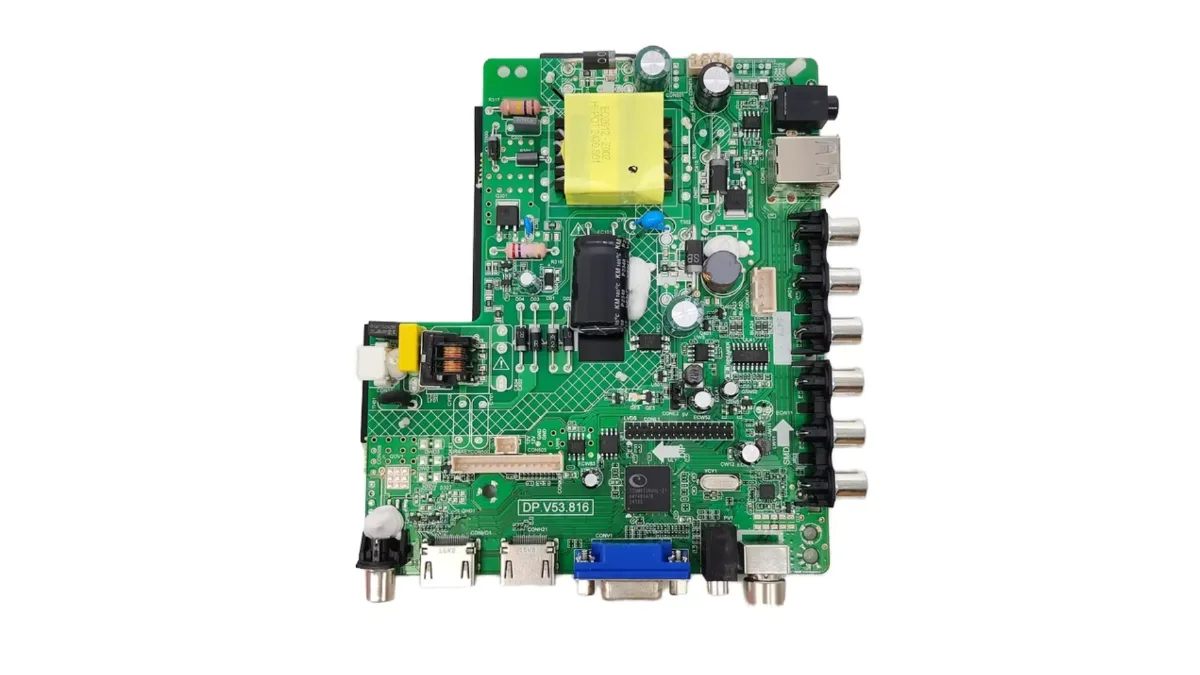
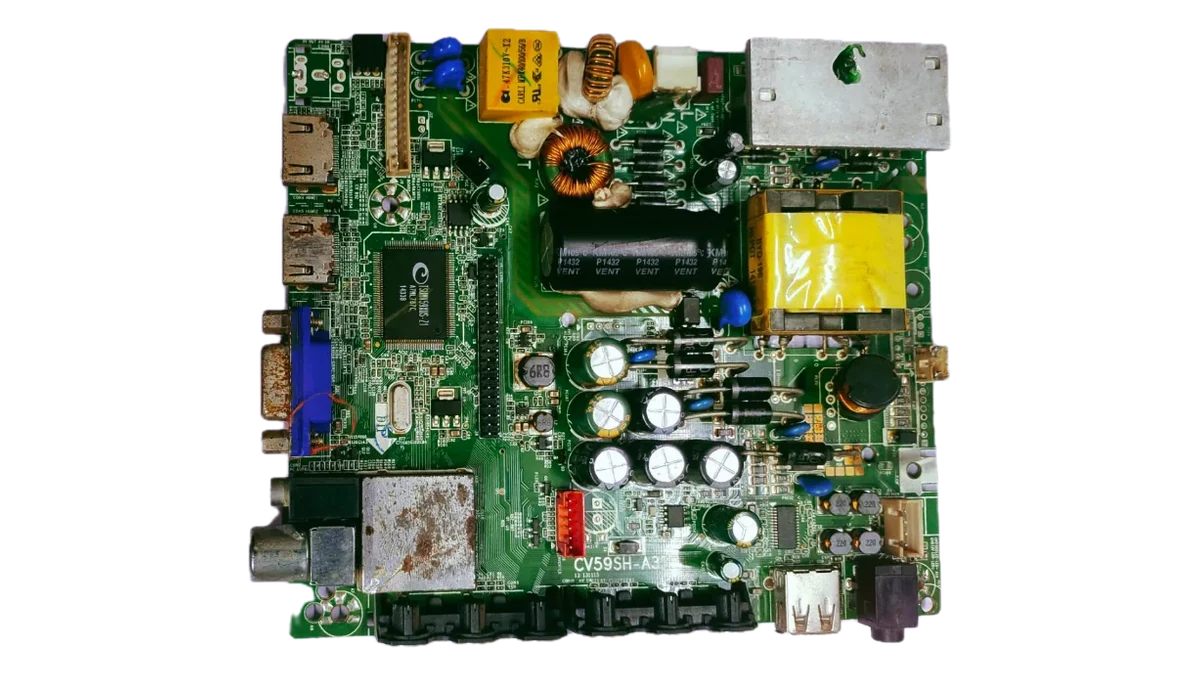
- The board number, printed on the motherboard itself, such as T.R67.03 V10, CV59SH-A32 or TP.MS3663S.PB801. Every letter and number must match.
- The panel resolution, from the sticker on the back of the panel: 1366x768, 1920x1080 or 3840x2160. The same board drives different screens and each needs its own software.
- The RAM and memory on smart boards, because Android software is built for a particular memory size.
Find software fast on module.pk
Our TV software page has a finder at the top: type the board number or the TV model, such as T.R67.03 or LE32B8000, and matching software appears straight away. If you are not sure about the screen, the panel check lets you type the number from the panel sticker, such as HV320WHB-N80, and tells you its resolution. Filters down the side narrow the list by resolution, board type (universal or smart Android) and TV brand, and each version shows its file size and price before you download.
Buying TV firmware from outside Pakistan
Firmware is a download, so where you live makes no difference. Customers outside Pakistan see prices in US dollars and pay securely with PayPal or a debit or credit card. Customers in Pakistan pay in rupees by Easypaisa, JazzCash or bank transfer.
- Instant download after payment, and the file stays in your account to download again later.
- Tested files, marked on each version, taken from working TVs and boards.
- File size shown before you buy, so you know what you are downloading.
- Help on WhatsApp from technicians if you are unsure which version fits your board.
How TV software is installed
Full instructions with pictures, and what to do if the picture is upside down after installing, are in our TV software guide. Our team can also load software onto a universal motherboard before it is shipped.
- Format a USB stick as FAT32 and copy the software file to it, with the file name the board expects.
- Unplug the TV, insert the USB stick into the TV's USB port.
- Hold the power button on the TV, or follow the board's own update method, while plugging the TV back in.
- Wait until the update finishes and the TV restarts. Never unplug it during the update.
Frequently asked questions
Where do I find my TV board number?
It is printed on the motherboard inside the TV, usually near the edge, in a format like T.R67.03 V10 or CV59SH-A32.
Can wrong software damage my TV?
Wrong software usually gives a wrong picture or a boot loop, which is fixed by installing the right file. Always match the board number and panel resolution.
Is the software free?
Some files are free and some are paid. The price is shown beside each version on the software page.
Can I buy TV firmware from outside Pakistan?
Yes. Customers abroad pay in US dollars with PayPal or a card and download the file instantly.
اردو میں
ٹی وی سافٹ ویئر اور فرم ویئر ڈاؤن لوڈ: اپنے LED ٹی وی بورڈ کا صحیح فرم ویئر ڈھونڈیں اور ڈالیں، دنیا میں کہیں بھی
ہر LED ٹی وی بورڈ ایک سافٹ ویئر پر چلتا ہے جسے فرم ویئر بھی کہتے ہیں، جو بورڈ کی فلیش میموری چِپ میں ہوتا ہے۔ یہ خراب ہو جائے، یا یونیورسل بورڈ نئے پینل پر لگے، تو ٹی وی لوگو پر رک سکتا ہے، بار بار ری سٹارٹ ہو سکتا ہے، تصویر الٹی یا شیشے جیسی الٹ سکتی ہے، یا رنگ غلط آ سکتے ہیں۔ صحیح سافٹ ویئر ڈالنے سے زیادہ تر یہ چند منٹ میں ٹھیک ہو جاتا ہے، صرف ایک USB سے۔
اس گائیڈ میں صحیح فائل پہچاننے کا طریقہ ہے۔ ہمارا ٹی وی سافٹ ویئر اور فرم ویئر کیٹلاگ بورڈ نمبر اور ٹی وی ماڈل سے سافٹ ویئر دکھاتا ہے، اور ہماری قدم بہ قدم انسٹال گائیڈ میں پوری تفصیل ہے۔
دنیا میں کہیں بھی ٹیکنیشن اور ٹی وی والے ہم سے ڈاؤن لوڈ کر سکتے ہیں۔ ہمارے کیٹلاگ کے یونیورسل بورڈ، جیسے T.R67.03، CV59SH، TP.MS3663S اور V56، جنوبی ایشیا، مشرق وسطیٰ، افریقہ اور اس سے آگے بکنے والے ٹی وی میں لگتے ہیں۔ مفت فائلیں فوراً ڈاؤن لوڈ ہوتی ہیں، اور پیسوں والی فائلیں باہر سے ڈالر میں PayPal یا کارڈ سے خرید کر فوراً ڈاؤن لوڈ کی جا سکتی ہیں۔ نہ کوریئر، نہ انتظار۔
ٹی وی فرم ویئر کیا ہوتا ہے؟
فرم ویئر ٹی وی بورڈ کا آپریٹنگ سسٹم ہے۔ یہ بورڈ کو بتاتا ہے کہ کون سا پینل چلانا ہے، کس ریزولوشن پر، کس طرف سیدھا، بیک لائٹ کیسے چلانی ہے، کون سا ریموٹ سننا ہے اور کون سا لوگو دکھانا ہے۔ ایک ہی بورڈ بہت سے پینل کے ساتھ لگتا ہے، اس لیے ہر پینل کی اپنی سافٹ ویئر فائل ہوتی ہے۔
کب ٹی وی کو نیا سافٹ ویئر چاہیے
- ٹی وی لوگو پر رک جاتا ہے یا بار بار ری سٹارٹ ہوتا ہے۔
- بورڈ بدلنے کے بعد تصویر الٹی، شیشے جیسی الٹ یا کٹی ہوئی ہے۔
- رنگ غلط ہیں، یا تصویر کھنچی ہوئی یا ڈبل ہے۔
- نئے بورڈ پر ریموٹ نہیں چلتا۔
- مینیو غلط زبان میں ہے یا کسی اور برانڈ کا لوگو آتا ہے۔
ڈاؤن لوڈ سے پہلے تین چیزیں چیک کریں
آپ ہمارے کیٹلاگ میں ٹی وی ماڈل سے بھی سرچ کر سکتے ہیں، جیسے CX-32U571 یا 40D3900i، کیونکہ بہت سے سافٹ ویئر پیج پر لکھا ہے کہ وہ کن ٹی وی ماڈلز سے لیے گئے۔
- بورڈ نمبر، جو مدر بورڈ پر لکھا ہوتا ہے، جیسے T.R67.03 V10، CV59SH-A32 یا TP.MS3663S.PB801۔ ہر حرف اور نمبر ملنا چاہیے۔
- پینل کا ریزولوشن، پینل کے پیچھے سٹیکر سے: 1366x768، 1920x1080 یا 3840x2160۔ ایک بورڈ مختلف سکرین چلاتا ہے اور ہر ایک کا الگ سافٹ ویئر ہے۔
- سمارٹ بورڈ پر RAM اور میموری، کیونکہ اینڈرائیڈ سافٹ ویئر خاص میموری کے لیے بنتا ہے۔
module.pk پر جلدی سافٹ ویئر ڈھونڈیں
ہمارے TV software پیج پر سب سے اوپر فائنڈر ہے: بورڈ نمبر یا ٹی وی ماڈل لکھیں، جیسے T.R67.03 یا LE32B8000، اور ملتا سافٹ ویئر فوراً سامنے آ جاتا ہے۔ سکرین کا پتا نہیں تو پینل چیک میں پینل کے سٹیکر کا نمبر لکھیں، جیسے HV320WHB-N80، اور وہ ریزولوشن بتا دیتا ہے۔ سائیڈ کے فلٹر ریزولوشن، بورڈ کی قسم (یونیورسل یا سمارٹ اینڈرائیڈ) اور ٹی وی برانڈ سے لسٹ چھوٹی کرتے ہیں، اور ہر ورژن پر ڈاؤن لوڈ سے پہلے فائل سائز اور قیمت لکھی ہے۔
پاکستان سے باہر سے ٹی وی فرم ویئر خریدنا
فرم ویئر ڈاؤن لوڈ ہوتا ہے، اس لیے آپ کہاں رہتے ہیں اس سے فرق نہیں پڑتا۔ پاکستان سے باہر کے کسٹمر کو قیمت امریکی ڈالر میں دکھتی ہے اور وہ PayPal یا ڈیبٹ یا کریڈٹ کارڈ سے محفوظ طریقے سے پیسے دیتے ہیں۔ پاکستان میں کسٹمر روپے میں Easypaisa، JazzCash یا بینک ٹرانسفر سے دیتے ہیں۔
- پیمنٹ کے بعد فوراً ڈاؤن لوڈ، اور فائل آپ کے اکاؤنٹ میں رہتی ہے تاکہ بعد میں دوبارہ ڈاؤن لوڈ کر سکیں۔
- ٹیسٹ کی ہوئی فائلیں، ہر ورژن پر نشان کے ساتھ، چلتے ٹی وی اور بورڈز سے لی گئیں۔
- خریدنے سے پہلے فائل سائز، تاکہ پتا ہو کیا ڈاؤن لوڈ ہو رہا ہے۔
- اگر پتا نہ ہو کہ کون سا ورژن آپ کے بورڈ کا ہے تو ٹیکنیشنز سے WhatsApp پر مدد۔
ٹی وی سافٹ ویئر کیسے ڈالا جاتا ہے
تصویروں کے ساتھ پوری ہدایات، اور انسٹال کے بعد تصویر الٹی آئے تو کیا کریں، ہماری ٹی وی سافٹ ویئر گائیڈ میں ہے۔ ہماری ٹیم یونیورسل مدر بورڈ بھیجنے سے پہلے اس میں سافٹ ویئر بھی ڈال سکتی ہے۔
- USB کو FAT32 میں فارمیٹ کریں اور سافٹ ویئر فائل اسی نام سے کاپی کریں جو بورڈ مانگتا ہے۔
- ٹی وی کا پلگ نکالیں اور USB ٹی وی کے USB پورٹ میں لگائیں۔
- ٹی وی کا پاور بٹن دبا کر رکھیں، یا بورڈ کا اپنا طریقہ اپنائیں، اور ٹی وی کا پلگ واپس لگائیں۔
- اپ ڈیٹ ختم ہونے اور ٹی وی ری سٹارٹ ہونے تک انتظار کریں۔ اپ ڈیٹ کے دوران کبھی پلگ نہ نکالیں۔
اکثر پوچھے جانے والے سوال
میرے ٹی وی کا بورڈ نمبر کہاں ملے گا؟
یہ ٹی وی کے اندر مدر بورڈ پر لکھا ہوتا ہے، عام طور پر کنارے کے پاس، T.R67.03 V10 یا CV59SH-A32 جیسا۔
کیا غلط سافٹ ویئر سے ٹی وی خراب ہو سکتا ہے؟
غلط سافٹ ویئر سے عام طور پر تصویر غلط آتی ہے یا ٹی وی بار بار ری سٹارٹ ہوتا ہے، جو صحیح فائل ڈالنے سے ٹھیک ہو جاتا ہے۔ ہمیشہ بورڈ نمبر اور پینل ریزولوشن ملائیں۔
کیا سافٹ ویئر مفت ہے؟
کچھ فائلیں مفت ہیں اور کچھ پیسوں والی۔ ہر ورژن کے ساتھ سافٹ ویئر پیج پر قیمت لکھی ہے۔
کیا پاکستان سے باہر سے ٹی وی فرم ویئر خرید سکتے ہیں؟
جی ہاں۔ باہر کے کسٹمر ڈالر میں PayPal یا کارڈ سے پیسے دے کر فائل فوراً ڈاؤن لوڈ کرتے ہیں۔